
You are not logged in.
- Topics: Active | Unanswered
#601 Re: News & Announcements » Initramfs changes in Excalibur + refracta2usb » 2025-04-29 15:12:42
Count me in on testing, downloading now.
#602 Re: Off-topic » Lightweight system without (too) bloated software » 2025-04-28 18:22:06
^^^As fsmithred pointed out to me today, most of us already have a calculator onboard that was brought in with xorg in the x11-apps package called xcalc.
Open a terminal and type xcalc, it's pretty nifty!
Also a tiny text-editor called xedit in that same suite of utilities.
#603 Re: Documentation » How to generate thumbnails of GIMP .xcf files in your file-manager » 2025-04-28 00:32:10
Verified the thumbnail-cacher script is working perfectly in Mate/Caja in addition to Openbox/PcmanFM.
For PcmanFM it's a great band-aid, makes using it so much faster running this one-time on startup. But it's also useful in Mate if you run a cleanup via Bleachbit or other means that deleted the old thumbnail cache either manually or with a cron job, running this script will generate new thumbnails and cache them, sweeping only your home folder.
Pulled down the full script for now, takes a lot of ram for big .xcf's and multiples of them.
#604 Re: Off-topic » Lightweight system without (too) bloated software » 2025-04-27 17:44:49
Not familiar with qcalc, so I can't make a comparison, but I usually use galculator for years now, very small and fast and does what I need.
#605 Re: Off-topic » Lightweight system without (too) bloated software » 2025-04-27 17:38:57
Rule-of-thumb that's been helping me downsize over the years, is this:
Never look in the repo first for packages to solve your problem, when it might be solved using resources already onboard and a tiny shell-script.
Yad + dash = your friend!
#606 Re: Documentation » How to generate thumbnails of GIMP .xcf files in your file-manager » 2025-04-27 17:30:48
Even better now, added parallel processing and got the whole thing better than 50% faster, and that's just using my cheapie 13 year old dual-core APU, anything more modern and it's set to use up to 4 processes and should just fly.
#607 Re: Documentation » How to generate thumbnails of GIMP .xcf files in your file-manager » 2025-04-26 00:05:16
Got it worked out, now i've got the thumbnailer script doing .xcf's, using gimp in the background was really the only way, so it does take some resources and some extra time on the .xcf's...seems like there ought to be a faster lighter way, but it does have to do a lot. It's not bad at all if there's just a few, and you won't even notice it most likely when the script runs on startup. Takes about an extra 20 seconds to do a few, everything else is super-quick.
First run if you have a lot of un-thumbnailed .xcf's might take a while, but in every day use even a few hours of gimp'ing will only leave me with a few new .xcf files, most of the new files generated in a session like that will be .png's and they thumbnail super fast.
#608 Re: Off-topic » Lightweight system without (too) bloated software » 2025-04-25 23:47:00
I agree with the above, the clipboard manager is indispensable in what I do, I use it every day many times a day.
But Parcellite is light, fast, and simple, just a nice list of copies, I don't need all the extra functionality. Plus it's ten times smaller than copyq and doesn't drag in a mountain of QT depends like copyq does. Simple gtk2. 
#609 Re: Off-topic » Lightweight system without (too) bloated software » 2025-04-25 17:13:31
No love for Parcellite? I have used it for years, works fine for my needs. Bonus: i've never had to configure it, drops into Mate panel automatically no config issues. Works great in Tint2 as well, just need to add it to Openbox autostart file.
#610 Re: Devuan Derivatives » Devuan 6 (excalibur) mate testing iso uploaded » 2025-04-25 16:52:15
4-25-2025
New Devuan 6 testing iso uploaded, some 124 updates including
a new kernel, but the biggest update was upgraded Caja packages that fixed the previous
version's .xsession-errors bug. It's working great again. Many thanks to the folks at Mate
and the maintainers for pushing those fixes through lickety-split!
Again, this is testing, so there are likely more bugs to be found, that's what this iso is for.
And remember, this is NOT an official Devuan iso, it's a user snapshot of the current state
of Excalibur using a minimal Mate desktop with a few packages I threw in extra for convenience.
#611 Re: Other Issues » Getting a ton of the same errors in .xsession-errors in excalibur » 2025-04-24 14:58:19
And now the fixed version has been pushed into trixie, I need to double-check and make sure they are in excalibur too, and it will be time to cook up another tasty testing iso.
Really starting to appreciate .xsession-errors, it's helped me to fix a ton of small bugs, many that I didn't know existed.
But with Mate in general, I think it just likes to complain. Even in the current version I get a ton of errors from mate-session, mate-session-check-accelerated, mate-settings-daemon, marco, caja etc. all complaining about theme-parsing errors in the gtk-css.
In Openbox I get zero complaints about anything theme related. And I can't seem to narrow down what Mate has an issue with anywhere in the css, I have checked it through and through and updated where necessary and ran it through automated checkers as well, go figure.
Maybe the new version fixes some of that too, will find out hopefully by later today!
#612 Re: Off-topic » Access to CUPS archives denied » 2025-04-23 22:49:50
Arrgh...apple...bonjour...cups-browsed...hot mess is what it is.
#613 Re: Documentation » How to generate thumbnails of GIMP .xcf files in your file-manager » 2025-04-23 22:29:18
The webp thumbnailer actually just uses the gdk-pixbuf-thumbnailer as does the librsvg thumbnailer, it's all in the gdk-pixbuf these days for most common image formats except for heif/heic/avif.
I'd thought about using Imagemagick first off, but for my script python3-pil worked great.
Also I wasn't sure if Imagemagick can create an actual linked thumbnail per spec, or just make some smaller copies of the image? i.e. filename per XDG spec (MD5 of file URI), metadata etc.
That's the beauty of using the onboard thumbnailers, makes for an easy script to write for what I wanted. Maybe i'm just being thick-headed and lazy, lol.
And as you mentioned, layers is an issue. I've seen a bunch of examples of IM thumbs for .xcf that turned out to be a blank black or white square because that's the first layer on what most projects start out with. The thumbs kicked out by Gimp however all look perfect, a small background thumbnailer using gimp would likely be the best bet.
#614 Documentation » How to generate thumbnails of GIMP .xcf files in your file-manager » 2025-04-23 20:03:21
- greenjeans
- Replies: 5
Well long story short after much research, apparently for a couple of years now .xcf thumbnailers have disappeared, likely with the rollout of gimp 2.10 and some changes they made to the format, so all you get when you save an .xcf is the wilbur icon. Gdk-pixbuf does not support it and other programs to do so are abandoned.
So basically the only thing that can thumbnail them is gimp itself, but in 2.10 it doesn't do so automatically when you create a new file and save it as an .xcf.
Edit: I was wrong about gimp 2.10, it does generate a thumbnail and cache it when you save the file as an .xcf. Some flaws on my side in the original premise that were caused by another script and like an idiot I didn't set down and do real testing before launching off on a solution. Mea culpa GIMP. But the rest of the procedures here are valid if you have some un-thumbnailed .xcf's, possibly due to some scheduled cleanup operation you forgot about.
To get it to do so, open gimp, and at the top choose File >>Open
This will open gimp's file-browser, navigate to the folder with your .xcf's. There's a side-pane for previews in that file-browser, as you scroll to your .xcf's they will still show the wilbur icon but there is a message in that preview pane to "click for preview", click that and gimp immediately generates a thumbnail that gets stored, and when you go back to your file-manager the .xcf will now show as a proper thumbnail of the image.
If anyone has information to the contrary, I and a lot of other folks would love to hear it!
A dirty little script would work if it didn't involve firing up the entirety of gimp, been working on a thumbnailer project the last few days and it works great, but it uses the native thumbnailers onboard like gdk-pixbuf and ffmpeg thumbnailers to do the work so it's very smooth and fast.
#615 Re: Devuan Derivatives » Vuu-do Linux! *New Openbox-64 iso's (1.0.7) up 2-02-18*!! » 2025-04-23 01:19:26
4-22-2025
New 5.03 Vuu-do Openbox Z's uploaded
Tons of tiny fixes, the theme change left some things undone. Added a lot of bug
and error fixes plus updated functionality quite a bit, support is extended for
newer image formats, and the biggest change is the addition of the thumbnail-cacher
script which assists PcmanFM in creating and caching thumbnails properly. This has
greatly speeded up image-heavy folder loading. Check the menu for the entry to
update the cache during sesssion if you add a lot of images or video.
From the comments in the script:
This script creates and caches thumbnails of image/video files.
It sweeps the users home folder only (excluding hidden files), checking for
image and video files and if they have a thumbnail cached, if not then it
creates new thumbnails and adds them to the thumbnail cache in ~/.cache.
It's set to only thumbnail files 100 kb and larger. It's intended use is for PcmanFM,
to assist in generating a proper thumbnail cache. It can be set to run once at boot/login,
and/or used as a menu entry to create an updated cache file at any time.

PcmanFM will continue to generate the cached thumbnails for images larger than
4.2 mb on-the-fly as you add them, run this after you add smaller images and it will add
them to the cache as well. At 4.2 mb or higher the thumbnail setting in PcmanFM works,
any lower and you start losing thumbnails randomly for some reason, this just catches
the smaller stuff albeit not on-the-fly which would be optimal, but image-heavy folder
loads are way faster when the images are already thumbnailed & cached.
Script located in /usr/local/bin if you want to edit thumbnail size or add thumbnailers/formats.
Atril has a thumbnailer which lets you add text and pdf thumbnails but I don't see a point in it.
I may try to add .xcf and maybe another video format to see what happens, but as of right now
it supports most major image formats, and .mpg, .mpeg, .mp4 and .mkv video formats. It also
works on the newer image formats that I added support for in Vuu-do not long ago, .avif, heic, heif, and .webp.
#616 Re: Off-topic » Lightweight system without (too) bloated software » 2025-04-22 16:20:26
I use gpicview for images, it's very light and fast but still has some nice features.
I've been trying out the Ranger CLI file-manager since fsmithred recommended it, I like it a LOT better than MC. It supports image and video previews and a lot more.
Imagemagick is great for a backend, I have some scripts using it and yad to do simple image-resizing and rotating that work great and fast as right-click context menu options in a file-manager.
#617 Re: Devuan Derivatives » Vuu-do Linux! *New Openbox-64 iso's (1.0.7) up 2-02-18*!! » 2025-04-21 04:06:11
Finally got around to working on a workaround for the bug I posted here https://bugs.debian.org/cgi-bin/bugrepo … ug=1100053
Doesn't seem like it's going to be fixed anytime soon as I have no replies. Got a workaround running using a script that creates cached thumbnails under 4.2 mb and applies them via autostart for users home. Checks for files at login, creates if there isn't one, updates if needed.
Pcmanfm runs nice and fast with this applied, initial and subsequent visits to file-manager with any images open waaaaay faster.
Still need some fine-tuning, but should have it done and new isos up soon!
ETA: well that was harder than I thought, almost there though....
#618 Re: DIY » An idea for 32-bit system for old machines, input requested » 2025-04-20 16:30:04
Did a test install yesterday, pulled out the last Vuu-do 32-bit mini I did in 2017 and installed on the computer while we were working on the library, only issue was it needed a newer version of e2fsck for some reason, but the two packages I needed to upgrade were in the archive repo and after installing those in the live session the install worked perfectly.
It idles at a whopping 85 mb of ram, lol, and that's with conky running which takes another 10-15 mb typically. Runs really fast on that old machine. I think re-building it and making a max version too will be very worthwhile. Going to test next with a 32-bit appimage of either FF or Chromium so as to have a modern browser that works.
I've got a lot of irons in the fire right now, so my time may be limited, what I really need to know is how much longer the Jessie repo at archive.devuan.org will be available?
If anybody knows that would be great, if it's to be shut down any time soon I might be able to shuffle my schedule around and get it done fast, otherwise if it's going to be up for a while i'd like to take my time and polish it up a fair bit.
#619 Re: Off-topic » Lightweight system without (too) bloated software » 2025-04-20 13:59:26
I do love me some Imagemagick, but I use Scrot for screenshots, super lightweight yet very configurable.
#620 Re: Off-topic » Show your desktop (rebooted) » 2025-04-17 16:26:49
Still working the dark blues and grays.
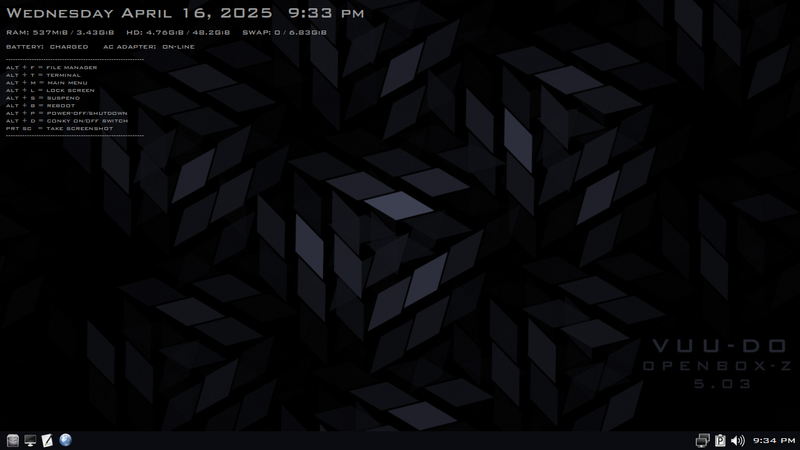
#621 Re: Devuan Derivatives » Vuu-do Linux! *New Openbox-64 iso's (1.0.7) up 2-02-18*!! » 2025-04-17 01:16:19
4-16-2025: Updated Vuu-do ob-max-z uploaded.
4-18-2025: Mini-z now up as well.
Major updates to artwork, all new original stuff, wallpaper & login background,
grub splash, lock screen, user avatar etc. Lots of package updates including a new
kernel and security updates. New menu entry to configure keyboard and much nicer
gui for that and also for changing tzdata via right-click on the panel clock, and
many other small tweaks. Ob-max is first up, will get a new mini up here soon.
Lots of changes in this one, and minor tweaks galore, finally got around to updating
the conkyrc to the newer lua format, fixed an icon issue and stomped some more
tiny bugs. Added the keyboard-config menu entry, wrote a tiny script for it as it
didn't have a confirmation dialog for when you get done. Thanks to fsmithred once
again as I snagged some code from the pre-install scripts in Refracta-Installer to
make the keyboard and tzdata functions much prettier and easier to deal with.
#622 Re: Devuan Derivatives » Vuu-do Linux! *New Openbox-64 iso's (1.0.7) up 2-02-18*!! » 2025-04-16 15:40:33
Thank you Glenn! That's very kind of you to say, good to wake up to after working into the wee-hours last night.
I took @deepforest's comments to heart, and decided to offer some alternative artwork that's not so zombie-fied, but still works with the darker theme I use. Started out intending to just do something specifically for Vuu-do Openbox versions, but as usual once I start working with fractals it takes hours and hours and I wind up with several dozen pieces of assorted artwork.
But I did get a piece made that seems to work. it's tough (at least for me) to make things that are coherent using fractals, super-easy to make a bunch of pretty swirls and abstractions, but my goal here was to make something that referred to the term "openbox" in a graphic way. Here's where I am as of late last night, the thumbnail is clickable and takes you to the fullsize version, it's a pure fractal render, only used Gimp for the text and to darken it up some:

#623 Re: Devuan Derivatives » Vuu-do Linux! *New Openbox-64 iso's (1.0.7) up 2-02-18*!! » 2025-04-15 18:12:18
Pushed a new update to the Vuu-do mate-mini iso, new kernel plus security and regular updates and some other stuff.
Working on the OB's now, some significant improvements in those coming up in addition to updates.
#624 Re: Desktop and Multimedia » openoffice writer and impress constantly crash Xorg » 2025-04-14 18:34:24
Not familiar with OpenOffice, but my wife uses Libreoffice here quite a bit, mostly writer and calc. And it's been flawless in Devuan.
If you're in a hurry that may be a temp solution until you get the OO issue figured out.
#625 Re: Desktop and Multimedia » Desktop locking up / temp freezes » 2025-04-13 16:49:57
Symptoms sound exactly like what happens when ram gets maxed out and starts spilling over into swap, Devuan's pretty robust for me so it takes a lot to make it happen, like multiple browser tabs + starting some other programs. Like you OP I only have 4 gigs of ram.
Conky display is helpful, I have mine set to display ram and swap usage in addition to other things, and the few times i've had this happen to me it's always that ram got maxed out and there will now be content in the swap partition.
I've got an old 2005 machine that runs, but it only has 1 gig of ram, so it's super-easy to make it happen, maybe 4 browser tabs and it gets sloooooooooowww....
Board footer
