
You are not logged in.
- Topics: Active | Unanswered
#501 Re: Off-topic » GNOME is taking the scum bag approach still... » 2025-06-27 20:32:12
Stop theming our apps, it messes with our "brands"...i'm too freakin' sure...spoiled children who have no idea what free software is about, shit like that is why i'm focusing on trying to make my own apps these days.
#502 Re: Off-topic » GNOME is taking the scum bag approach still... » 2025-06-27 20:25:52
I saw that steamroller coming the week they rolled out gnome 3 and somebody rolled up a test iso, I tried it being excited because I really enjoyed gnome 2, my gawd it was awful. And it's even worse now years later...
"You all need mandatory supervised access to the Internet from now on..."
^^^And right ****ing there we see who the real fascists are.
#503 Re: DIY » Working on a new app, the learning curve continues... » 2025-06-27 20:18:51
I got rid of all the utilities that didn't need to be on there with some creative exclusions, so that cleaned up a lot.
#504 Re: DIY » Working on a new app, the learning curve continues... » 2025-06-27 20:04:14
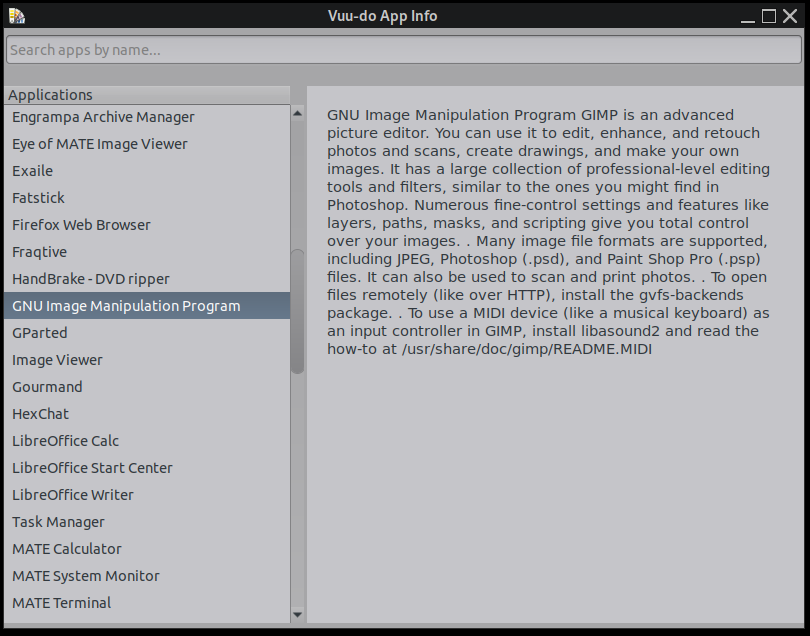
^^^ Oh hell no, lol! Been fighting with the main script (C) all morning trying to get the text and bullet points properly formatted, so far all i've succeeded in doing is changing the font and spacing which does look much nicer, but still, i'm no C wiz, no way i'm ready to take on doing the scraper in C, I just now got it whipped into beautiful working shape and even that took a ton of trial and error despite shellscript being something i'm decent at now.
EDIT: The below scripts have been changed a lot and are now obsolete.
#505 Re: DIY » Working on a new app, the learning curve continues... » 2025-06-27 01:28:16
Holy cow has it ever been a day, I don't know how y'all that do this for a living do it, just grateful that you do!
After tons of adding functions of various types I finally have it nailed down 99.99%. Had to add some Mate-specific exclusions along with others to get rid of the simple utilities that are self-explanatory, Openbox won't have those issues but I imagine if someone tried this with another DE that more exclusions would have to be added. Scraper script is pretty complex now, and takes quite a while to run, it's only a one-time run needed for this, honestly I could have just typed out the database in short order, but that's not the point of this exercise.
End goal is to integrate this with the release notes/manual I do in Vuu-do, and provide an all-in-one help app for folks brand new to linux to get oriented quickly.
Still needs a little work on text-formatting, i'm tempted to try and see if parallel-processing can speed up the scraper script, but that's low priority since it only needs to run once, just considering it for the experience and furthering my knowledge-base.
If anybody is interested let me know and i'll post up the two scripts, you'll have to compile the C yourself but that's super-easy and only takes a few seconds, just need GCC and libgtk3-dev.
#506 Re: Off-topic » GNOME is taking the scum bag approach still... » 2025-06-27 01:16:37
Holy crap, wtf is wrong with those people???
#507 Re: Hardware & System Configuration » Canon LBP6020 » 2025-06-26 21:35:49
I've got a Canon Pixma from about 8 years back, all I had to do was download a driverpack from canon, extract the PPD for my machine and put it in the right place. I think those drivers are now actually onboard one of the driver packages in the repo.
#508 Re: DIY » Working on a new app, the learning curve continues... » 2025-06-25 23:19:55
Here's the scraper script if anyone has any suggestions for my little issue with it not grabbing the description for some apps, ignore the paths at the top, it's not an Appimage, that's just a directory that wound up to be my area for all experiments:
EDIT: Been messing with this all day today, and am soooooo close to now to 100% with the scraper, fixed like 90% of the issues. But a few minutes ago I had a forehead slapper moment, I think i've been going about this the hard way, gonna try a little different tack.
#509 Re: DIY » Working on a new app, the learning curve continues... » 2025-06-25 23:01:21
Thanks guys!
Yeah Yad + shellscript was my first instinct as it's my go-to for so many things, but just couldn't get it to look and act right. Also tried using webkit to make a little browser basically as i've had some luck on another app doing that and python for the rest, but still no luck. Finally used C and just plain ol gtk and that worked insanely well and fast for the GUI, took a fair amount of tries but i'm happy with it. The separate scraper script is done in bash.
Got to looking at yad while trying to work that out, fired up the yad-icon-browser which was super-close to what I wanted, and I always figured since it came packaged with yad that it was made with yad, lol, nope. Binary file written in C so I really don't understand why it's packaged with yad as there is almost no yad in it whatsoever. But....
The source code for it is very small, and it was just a matter of stripping out a lot of it that I didn't need, then re-writing it a bit to scrape a text file for content rather than the icons. I'm using that text file created by the scraper script instead of sqlite for a database. One of the goals here was to NOT have to install extra depends for this over and above what's typically on a basic system, keeping it simple, small, and fast and doing one job well.
Still need to fine-tune the scraper script, it's missing the description portion in about 10% of the apps, mainly ones with weird names for their .desktop files instead of straightforward ones, like Handbrake ought to be handbrake.desktop, but instead it's "fr.handbrake.ghb.desktop" and Hexchat is "io.github.hexchat.desktop", somehow that's defeating me, currently trying some new mods to the script.
#510 Re: Installation » How to Install XLibre on Devuan Daedalus (MATE)? » 2025-06-25 17:23:53
I mean I could probably do it in a VM or chroot, but not to put too fine a point on it... That's a lot of mucking about and the lack of effort from anyone else around here (who, unlike me, stand to benefit directly) isn't particularly motivating.
Bro, the project is literally in it's infancy, I only heard about it here when brocashelm posted about it. Cut us some slack, give us time to catch up...we all have busy lives outside of linux. There's plenty of Devuan folk on the xlibre IRC channel right now who are interested in helping, myself included.
#511 DIY » Working on a new app, the learning curve continues... » 2025-06-25 01:52:19
- greenjeans
- Replies: 28
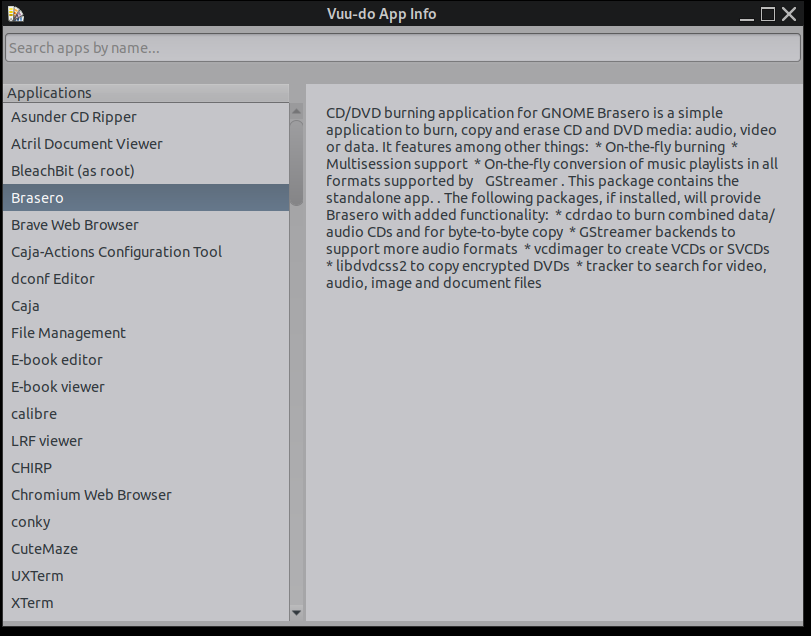
EDIT: App fininshed and packaged and uploaded for testing! https://sourceforge.net/projects/vuu-do … -App-Info/
You'll need to have yad installed as well as imagemagick. Updated pic of how it looks in post #15 in this thread.
Been screwing around most of the day with this, had never messed with C before, or compiling it so this is a first for me, awesome learning experience but omg does it ever take me forever to figure out how to do simple stuff, lol, RRQ probably could do it in 5 minutes on leafpad!
Simple app to list applications installed and a description, also has a search function that starts working as soon as you start typing, it scrapes /usr/share/applications then cross-references that list with /var/lib/dpkg/status for the description. Simple but possibly useful to the new folks I convert to linux around here. Here's a screenshot, nothing fancy and this is just the working prototype, I have a lot of work to do yet polishing up the text area as it's kinda shoved all together right now:
#512 Re: Hardware & System Configuration » Where to view system requirements Devuan » 2025-06-24 12:34:47
13 year old laptop here, dual-core APU that claims 1 ghz but really runs about 800 mhz. 4 gb of ram.
Runs Devuan like a champ!
#513 Re: Other Issues » [SOLVED] Could not write to external drives after update » 2025-06-22 15:01:04
Okay, if it were me, my first step would be to look at the apt history via synaptic in my case (also a copy in root's home usually), and note what packages were updated, then figure out which one did it. Specifically was there an update of UDisks?
Maybe a setting in the file manager too, most have some adjustable settings for what to do with external media.
/usr/share/polkit-1/actions/org.freedesktop.UDisks2.policy is where the permissions for devices are, this is most likely culprit in my experience.
ETA: Or a messed up stick that has the wrong permissions. Have had that before, but mostly with sd cards.
#514 Re: Other Issues » [SOLVED] Could not write to external drives after update » 2025-06-21 15:08:55
Perhaps a change in rules in whatever polkit is used in KDE? Just a guess, I know zilch about KDE.
#515 Re: Off-topic » Debian removed multi-init support from the latest shipped grub » 2025-06-20 11:55:07
The ongoing trend of raging against the machine and devolving into politics continues, rather than learning how things actually work and *shock* configuring your stuff directly or *horror* doing some entry-level shell scripting.
Amen.
I do love solving problems with small shell-scripts, they may be small but they are powerful as hell.
#516 Re: Devuan Derivatives » Devuan 6 (excalibur) mate testing iso uploaded » 2025-06-20 11:47:04
^^ Good luck my friend! It's been a couple months so there will be quite a few upgrades needed to get current, I really need to roll up some updated versions of that and the Daedalus iso as well.
Devuan 5 with XFCE is using a gb of ram? At idle immediately post bootup with nothing running? That seems super high.
On my laptop, counting buffers and cache, Mate uses around 650 mb at idle on my machine. Openbox uses about 525.
If you take the buffers/cache out of it, it's about 450 and 275 respectively.
#517 Re: DIY » Need advice, building a small server for city-library-Devuan mirror » 2025-06-18 12:04:55
^^^ That's incredibly kind my friend, i'll have to think about that one.
Unfortunately I seem to have come down with the flu late last week, and it's still hammering me really hard, so all my projects are on hold for the moment as I barely have the energy to type.
Haven't been this sick since I had pneumonia 25 years ago. 
#518 Re: Installation » No live devuan or refracta will boot on a new AMD Ryzen AI 9 HX370 » 2025-06-13 00:20:05
^^ yep, might be better to try excalibur and the newer kernel.
#519 Re: Installation » No live devuan or refracta will boot on a new AMD Ryzen AI 9 HX370 » 2025-06-12 22:11:05
I followed your link and saw "This is not uefi-enabled"? So isn't that going to fail at the first hurdle? I don't think the BIOS on this machine will not boot from MBR?
I'm going by your first post in which you stated that you were able to go into BIOS and disable UEFI.
Regardless of efi, an MBR iso should still boot up as a livecd, and can be installed on an efi system by simply not installing grub when you install from the live system. You'll still need to update grub on whatever partition controls it.
It may be that you need additional firmware over and above what is provided in standard Devuan, that's always a possibility.
Please keep in mind that I am not a dev, just a user. So this is my best guesses. RRQ is probably who you need.
So at the link I sent you, there are also my own projects, Openbox and Mate, and those iso's contain a LOT of firmware, additional xorg packages, microcode and more, to help insure that they boot and work out of the box. Possibly one might help you, not trying to toot my own horn here, it's just that Devuan in fact is a "parent" distro from the get-go, and so there is a lot of software that it does not include by default that may be required for your machine. Devuan rightly assumes that anyone using them for a base will include such packages in their own distros and projects.
Why use anything but dd? I don't know, if you're confident with it then go for it, I base my advice on the idea that some folks may not be comfortable with such things, so I try to offer an easy to use GUI solution. 
#520 Re: Installation » No live devuan or refracta will boot on a new AMD Ryzen AI 9 HX370 » 2025-06-12 20:25:14
The "nox" in that Refracta iso stands for "NO X", so all you could get would be a tty as far as I know.
Not sure why you're trying a 32 bit iso on an ultra-modern machine with a really powerful CPU???
Here's a link to a livecd I made from vanilla Devuan Daedalus that uses the Mate desktop. It uses Refracta Installer instead of the slooooow way, lol, so about a 10 minute install. Try that on a liveUSB, perhaps you'll have better luck. FYI it is 64 bit.
https://sourceforge.net/projects/vuu-do … Mate-mini/
If you do install, run Gparted first (if needed) and check the boxes for "don't run the partitioner" at a couple places, then carefully choose which partition you want to use.
FYI: Don't burn the iso to a stick using Ventoy, Devuan doesn't work properly, use something else. Mintstick is in the repo and it works fine.
#521 Re: DIY » Need advice, building a small server for city-library-Devuan mirror » 2025-06-11 20:20:36
^^Oh that part I know already, I misspoke. What I meant to say was I wonder if it will be a software issue going forward if I used a non-uefi system to start with if the board will support it?
#522 Re: DIY » Need advice, building a small server for city-library-Devuan mirror » 2025-06-11 19:24:34
^^^ Yep that validates what i've been reading, that ZFS is a must on the storage drives. And Nginx instead of Apache was mentioned many places as being the better choice. But now we're talking about software and i'd like to keep this thread just about the hardware choices, i'll have a lot of questions later about software.
The list in the OP doesn't have a GPU, the integrated graphics are probably fine. But you did mention media transcoding, and that may be something i'll need to do here and there. It's ridiculously slow to do so on my APU-equipped laptop, would be nice to have something faster.
So the concensus seems to be do RAID1 for the OS too...interesting, not something I would have thought of.
One big question: Is this gonna work without EFI? Because I do hate it so.
#523 Re: DIY » Need advice, building a small server for city-library-Devuan mirror » 2025-06-10 22:04:49
Handling multiple client requests might indeed be the logic behind the SSD rec, though I seriously don't expect a lot of traffic...i'm flexible though, if we do go with an HDD instead of an SSD for the OS and it's not up to the task we can swap it out.
The RAID idea for the OS drive is compelling, have to think about that one a bit, my first instinct (and what I do at home) is roll up a copy using Refracta Snapshot, then if anything craps out it's just a 10 minute install to get back up and running.
Yeah I haven't put together a website in years, not looking forward to that part, but that will be a few months from now anyway, first priority is getting it set up and serving. I do have some friends though in that field that might help me out when it's time. I really miss the old Yahoo SiteBuilder to be honest, it was actually a great quick WYSIWYG editor for throwing up sites fast.
#524 Re: DIY » Need advice, building a small server for city-library-Devuan mirror » 2025-06-10 20:13:09
^^Good thoughts, thank you!
To your points/questions:
1. I'm not tied at the wrist and ankles to anything on that list, especially not SSD's, if anything that's the component I question the most.
2. I'll be the maintainer. I live literally half a block from the building that houses the library, city hall, and the fire/ems folks, I have my own key to the place. So i'll be doing the backups on a regular basis, my thought was to set up another pair of HDD's, air-gapped and not powered up when not in use as just simple storage for the backups.
Long-term my evil genius plan is to convert this whole place to a sanctuary-city for Linux, powered by Devuan (with a little Vuu-do here and there). I've already converted a number of locals to Devuan from windoze, and they really like it so far.
#525 DIY » Need advice, building a small server for city-library-Devuan mirror » 2025-06-10 16:42:24
- greenjeans
- Replies: 17
Hey friends, so am in the planning stages of possibly building a small server for my city and it's library, we are tiny, around 120 residents, small library around 5000 volumes or so.
The server would host the city's website (small and fairly static) with sub sections for the library and a couple of small museums in town, and info on reserving spaces at our local parks and portals to pay local bills. Would also house an archive of city records and such. The library section would have the database we are in the process of creating, and also host some royalty-free ebooks residents could download.
In addition, it would serve as a full mirror for Devuan, repository and iso-releases and such.
We have fiber, so bandwidth is great and no data-caps. Price is an issue because of our small budget, but the traffic would be small.
I have a preference for AMD CPU/GPU's as they generally play much better with linux than Nvidia does. I got online and asked AI for a build list, and the below is what it suggested, was hoping some of you more experienced folks might take a look and critique/tweak the list?
Any and all suggestions would be helpful, we are on a tight budget and i'm donating my time for free as is my wife on this project. I'll need probably a lot of advice on software and deployment when it comes time, but first things first I want to really nail down a good build list and submit the numbers for approval from the city manager and mayor. Here's the list:
### Custom-Built Server Recommendations
Building a server gives you flexibility to optimize for cost and specific needs. Since you’ve built desktops before, this is feasible, though it requires more research for compatibility. Here’s a recommended parts list for a budget server (~$500–$800):
- **CPU**: AMD Ryzen 5 5600G ($120–$150)
- 6 cores, 12 threads, 3.9 GHz base. Efficient, supports ECC RAM (with compatible motherboard), and has integrated graphics (no GPU needed). Suitable for web hosting, file serving, and mirroring.
- **Motherboard**: ASRock B550M Pro4 ($90–$120)
- Supports ECC RAM, 1 NVMe slot, 4 SATA ports, Gigabit Ethernet. Micro-ATX form factor fits compact cases.
- **RAM**: 16–32 GB ECC DDR4 (e.g., Kingston Server Premier, $80–$150 for 16 GB)
- ECC RAM is critical for ZFS and data integrity. 16 GB is enough for your current needs; 32 GB future-proofs for more VMs or containers.
- **Storage**:
- **OS Drive**: 500 GB SATA SSD (e.g., Samsung 870 EVO, $50–$70) for Devuan OS and web server.
- **Data Drives**: 2x 4 TB HDD (e.g., Seagate IronWolf or WD Red, $100–$120 each) in RAID 1 for archives and Devuan mirror. RAID 1 mirrors data for redundancy.
- **Case**: Fractal Design Node 804 ($100–$120)
- Compact micro-ATX tower, supports multiple drive bays, quiet cooling for a library environment.
- **Power Supply**: 400–500W 80+ Bronze (e.g., EVGA 500 BR, $40–$60)
- Efficient and reliable for low-power builds. Avoid overkill PSUs to save energy.
- **UPS**: CyberPower CP600LCD (~$70–$100)
- Protects against power outages, provides ~300W backup for 10–15 minutes.
- **Total Cost**: ~$550–$800, depending on storage and RAM.
Thanks!
Board footer
