
You are not logged in.
- Topics: Active | Unanswered
#26 2026-04-22 04:26:39
- Valera
- Member
- Registered: 2026-01-25
- Posts: 35
Re: [SOLVED] MX_Devuan_KDE_dinit
Devuan is a conservative system. The main principle is simplicity and reliability. SysVinit and OpenRC are reliable. Dinit has been in development for 10 years and the author has not yet published the final release 1. The same Turnstile is in development. Therefore, Devuan Unstable + Dinit + Turnstile is an experiment and an alternative to Artix. This may not be supported by the official team. In the world of Deb, experiments are done at AntiX and thanks to their work, this topic is here.
Last edited by Valera (2026-04-22 04:53:02)
Offline
#27 2026-04-23 19:56:05
- Valera
- Member
- Registered: 2026-01-25
- Posts: 35
Re: [SOLVED] MX_Devuan_KDE_dinit
Fixed the unmounting and shutdown in Live mode a little. At the same time, I changed the desktop settings 
Last edited by Valera (2026-04-23 19:57:20)
Offline
#28 2026-04-24 01:52:28
- nathan2423
- Member
- Registered: 2026-04-24
- Posts: 10
Re: [SOLVED] MX_Devuan_KDE_dinit
Hello -
I am a new user of Devuan, coming from MX-Linux. I would very much like access to the MX Tools, especially including snapshot capability. However I am an XFCE user and don't want to worry with KDE or Sonic.
Would your respin be a good place to start, and just add XFCE when I get it installed, or is there another way to get the full MX tool experience in Devuan?
Thanks very much for your work on this respin.
Offline
#29 2026-04-24 07:14:51
- brocashelm
- Member
- Registered: 2020-06-29
- Posts: 252
- Website
Re: [SOLVED] MX_Devuan_KDE_dinit
I would very much like access to the MX Tools, especially including snapshot capability.
Have a look at this thread posted at the Debian forums.
Do note that this guide was originally posted in early 2020, so you'll have to change "buster" on the repository sources to "trixie" if using stable (which Excalibur is based on), "forky" if using testing, and so on. It's also not recommended to add third-party repositories to Devuan-based systems in general, in case of build conflicts with any of the distro's banned packages list.
But, give it a shot, and report back if any issues occur.
Offline
#30 2026-04-24 10:09:10
- Valera
- Member
- Registered: 2026-01-25
- Posts: 35
Re: [SOLVED] MX_Devuan_KDE_dinit
Fresh link
https://mega.nz/file/jjRCEIKC#-t6DO_bvl … NHj8qwknzc
Last edited by Valera (2026-05-01 15:37:20)
Offline
#31 2026-04-24 10:16:43
- Valera
- Member
- Registered: 2026-01-25
- Posts: 35
Re: [SOLVED] MX_Devuan_KDE_dinit
>>Would your respin be a good place to start, and just add XFCE when I get it installed, or is there another way to get the full MX tool experience in Devuan?
Yes. I recently installed XFCE on this system. There are no problems with XFCE and X11.
Last edited by Valera (2026-04-24 10:19:54)
Offline
#32 2026-04-24 12:25:04
- nathan2423
- Member
- Registered: 2026-04-24
- Posts: 10
Re: [SOLVED] MX_Devuan_KDE_dinit
Thanks to Brocashelm and Valera for those replies. I am going to try them both as I move forward with this.
I suppose I probably should have asked another obvious question: Can I take my existing SysVinit MXlinux install and turn it into a Devuan-based MX system?
As I type this I'm realizing surely this has been asked before but rather than delete the question maybe it's not too inappropriate for this specific thread.
EDIT: So I do see this and presume this is the way to do that, though if anyone knows of something more MX-Specific I'd appreciate it. I didn't see a similar thread over at the MX forum. https://www.devuan.org/os/documentation … libur.html
Last edited by nathan2423 (2026-04-24 12:31:36)
Offline
#33 2026-04-24 12:45:09
- Valera
- Member
- Registered: 2026-01-25
- Posts: 35
Re: [SOLVED] MX_Devuan_KDE_dinit
>>I suppose I probably should have asked another obvious question: Can I take my existing SysVinit MXlinux install and turn it into a Devuan-based MX system?
That's exactly what I did, but it's been a long time ago and it's not that easy.
Now, at your request, I'm making a version with XFCE
Offline
#34 2026-04-24 19:37:39
- nathan2423
- Member
- Registered: 2026-04-24
- Posts: 10
Re: [SOLVED] MX_Devuan_KDE_dinit
"Now, at your request, I'm making a version with XFCE"
That will be greatly appreciated! I inquired over at this location ( https://devuboxlinux.github.io ) but that project doesn't seem currently active https://devuboxlinux.github.io. Someone put a lot of time and effort into the web page and setup, so maybe it isn't completely dead.
I'm also presuming that at some point I'll need to also be investigating Xlibre on Devuan, sort of like the Vendofoul Wolf project is doing but hopefully that will be easier when the time comes.
i probably would already be looking at that one but it appears to be primarily Spanish oriented and I'm never going to be very good at more than English. (And I just read the thread here on Vendufoul Wolf and that didn't give me much confidence in it. I'm glad I came here and read that before investing more time in Vendofoul.)
Last edited by nathan2423 (2026-04-24 19:53:45)
Offline
#35 2026-04-26 11:07:23
- Valera
- Member
- Registered: 2026-01-25
- Posts: 35
Re: [SOLVED] MX_Devuan_KDE_dinit
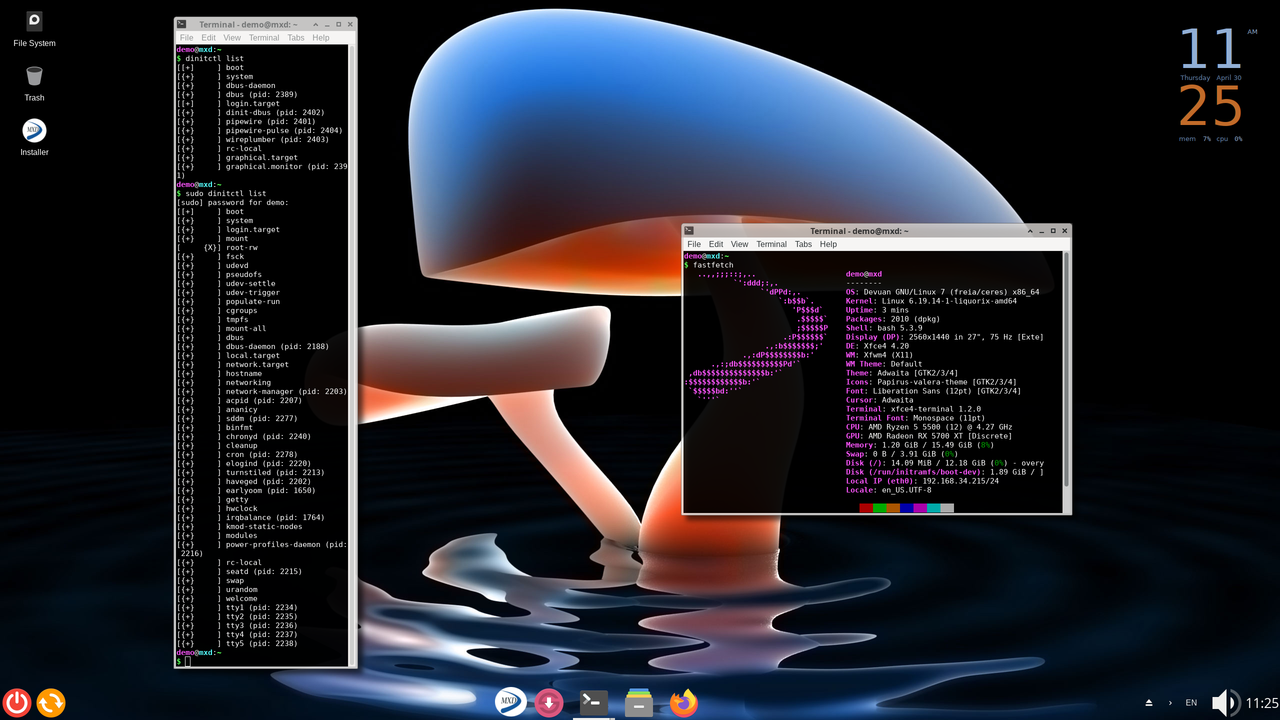
New minimal version.1.9 gb with XFCE
Rolling Devuan Unstable + XFCE + Dinit + MX Tools
https://mega.nz/file/DjQSxbjK#Dji9vo_AJ … yKCCybGROo
Last edited by Valera (2026-05-01 16:38:24)
Offline
#36 2026-04-26 21:06:16
- nathan2423
- Member
- Registered: 2026-04-24
- Posts: 10
Re: [SOLVED] MX_Devuan_KDE_dinit
Thank you! Will begin testing asap.
Offline
#37 2026-04-26 21:50:02
- nathan2423
- Member
- Registered: 2026-04-24
- Posts: 10
Re: [SOLVED] MX_Devuan_KDE_dinit
For some reason it is not picking up my wireless network connection so I will first have to work through that.
In the Devuan world is there anything that needs to be done to add firmware or otherwise make sure that wireless cards are detected? I have not had that problem lately with this computer I am working with with debian or artix or arch installations.
I also see that you did not include the "MXtweaks" tool. Probably understandable and no big loss, but thought i would mention it in case it was an oversight.
Let me say again thank you for this work and for your combination of Devuan unstable / xfce / dinit / MXtools! For my personal use testing the ability to make snapshots and then reinstall to other systems will be my first major test.
Last edited by nathan2423 (2026-04-26 22:16:55)
Offline
#38 2026-04-26 22:33:33
- brocashelm
- Member
- Registered: 2020-06-29
- Posts: 252
- Website
Re: [SOLVED] MX_Devuan_KDE_dinit
In the Devuan world is there anything that needs to be done to add firmware or otherwise make sure that wireless cards are detected? I have not had that problem lately with this computer I am working with with debian or artix or arch installations.
Try enabling non-free-firmware if you haven't yet (shown example line below):
deb http://deb.devuan.org/merged/ excalibur main contrib non-free non-free-firmwareUpdate your repositorites, and then install the particular firmware package(s) you need. Things like firmware-iwlwifi (Intel), firmware-brcm80211 (Broadcom/Cypress 802.11), firmware-realtek (Realtek), and so on. Follow the same steps that worked for you in Debian, as they should be the same in Devuan. This respin appears to be using NetworkManager, so these firmware packages should work just fine if the hardware matches. It just depends on what your system's wireless card is for it to work. For example, I recently bought 802.11 USB wireless card adapters for my laptops that struggle to connect without one (the aforementioned firmware-brcm80211 didn't support it), and had to rely on building a driver from this repository, since none of the firmware packages I installed were working.
Offline
#39 2026-04-27 00:20:22
- nathan2423
- Member
- Registered: 2026-04-24
- Posts: 10
Re: [SOLVED] MX_Devuan_KDE_dinit
Thank you Brocashelm! Valera is that something that would fit your vision to add into the respin itself? Thanks to you both.
EDIT: I thought perhaps my problem was that I was using an offbeat machine, but I just tested the iso on my Lenovo T460 and it doesn't recognize the wireless card there either. I presume the conclusion is that the iso as produced doesn't have the nonfree drivers and that's the fix i need to pursue.
Last edited by nathan2423 (2026-04-27 00:27:05)
Offline
#40 2026-04-27 05:34:41
- Valera
- Member
- Registered: 2026-01-25
- Posts: 35
Re: [SOLVED] MX_Devuan_KDE_dinit
Thank you for your feedback, I didn't add all the drivers. I'll fix it now.
Offline
#41 2026-04-27 06:10:46
- Valera
- Member
- Registered: 2026-01-25
- Posts: 35
Re: [SOLVED] MX_Devuan_KDE_dinit
I've added an firmware-iwlwifi and a few more and MX-tweak. Give it a try.
Offline
#42 2026-04-27 12:22:06
- nathan2423
- Member
- Registered: 2026-04-24
- Posts: 10
Re: [SOLVED] MX_Devuan_KDE_dinit
Thank you Valera!
I will test asap but in the meantime may I ask: Have you already successfully used the Snapshot feature to create a liveusb that has proven to be installable elsewhere? Are you in fact using that method to create your iso here?
That will be my first test once I get this up and running and I will let you know my experience.
Offline
#43 2026-04-27 13:26:14
- Valera
- Member
- Registered: 2026-01-25
- Posts: 35
Re: [SOLVED] MX_Devuan_KDE_dinit
>> Have you already successfully used the Snapshot feature to create a liveusb that has proven to be installable elsewhere? Are you in fact using that method to create your iso here?
Yes. This is how this iso was created. I immediately had problems when creating an image with XFCE + Lightdm, the lightdm service did not start when booting to live, I had to run Lightdm in tty without using dinit - sudo lightdm or startx. It's not pretty. So I made an iso with sddm. MX-Snapshot works for me.
Last edited by Valera (2026-04-27 13:31:03)
Offline
#44 2026-04-27 19:36:57
- nathan2423
- Member
- Registered: 2026-04-24
- Posts: 10
Re: [SOLVED] MX_Devuan_KDE_dinit
Valera thank you again for your work so far. I installed the iso without issue and it looks great - your design choices are very good.
Unfortunately it looks like there may be some other basic issues that i may not have the time to work through myself. For example, I use Vivaldi and downloaded that deb but when I tried to install it with gdebi i could not get that to execute. I then switched over to using an appimage of vivaldi but i ran into an error that fuse was not available. I installed fuse bu then when I rebooted the boot process halted with an error. I'm sorry I did not have the opportunity to write down the precise errors and I will try to go back over it again.
I didn't see the MX Package manager and that's understandable not to have it. Maybe I should have looked for and installed some other pacckagte manager to check dependencies. I'm good with using appimages but I'd prefer not to rely on flatpaks.
So i didn't get a chance to check the snapshotting and reinstalling, but if you indicate that it is working fine then I'm expecting a good result there.
I wonder - are you going to post a thread over at MXLinux about your work. Probably a lot more could be worked through quickly if you had more intelligent testers than I am.
Regardless you are off to a great start and I will check back in as soon as I can test more.
Thanks again!
Offline
#45 2026-04-28 03:41:09
- nathan2423
- Member
- Registered: 2026-04-24
- Posts: 10
Re: [SOLVED] MX_Devuan_KDE_dinit
After testing further I was able to make a snapshot and restore it successfully, so I've now met my general goals.
I'm able to get past most every glitch that comes my way, so again I appreciate your putting this together!
Offline
#46 2026-04-28 04:00:35
- Valera
- Member
- Registered: 2026-01-25
- Posts: 35
Re: [SOLVED] MX_Devuan_KDE_dinit
Thank you for your support. I now have a version with KDE. I installed fuse and then ran Vivaldi-Arch-x86-64.appimage - everything works. I'll check it later on the XFCE version. As for the package manager, there is Synaptic and it is the best. I've disabled the MX repositories so that updates from there don't cause conflicts, but you can install Vivaldi from official website.
I also tried the XFCE version, installed fuse, and ran Appilmage. I downloaded Vivaldi from the official site and installed without any problems: sudo dpkg -i vivaldi-stable_7.9.3970.59-1_amd64.deb
Last edited by Valera (2026-04-28 05:01:41)
Offline
#47 2026-04-28 04:53:36
- Valera
- Member
- Registered: 2026-01-25
- Posts: 35
Re: [SOLVED] MX_Devuan_KDE_dinit
>> I wonder - are you going to post a thread over at MXLinux about your work. Probably a lot more could be worked through quickly if you had more intelligent testers than I am.
I've made an alternative to ArtiX here - Devuan-based Rolling Release system with MX Tools. I don't think this will be of interest to the MX Linux community.
Last edited by Valera (2026-04-28 04:59:03)
Offline
#48 2026-04-28 13:55:46
- Valera
- Member
- Registered: 2026-01-25
- Posts: 35
Re: [SOLVED] MX_Devuan_KDE_dinit
Added picom and removed unnecessary packages in the XFCE version
Offline
#49 2026-04-28 14:36:14
- nathan2423
- Member
- Registered: 2026-04-24
- Posts: 10
Re: [SOLVED] MX_Devuan_KDE_dinit
I've made an alternative to ArtiX here - Devuan-based Rolling Release system with MX Tools. I don't think this will be of interest to the MX Linux community.
You may well be right, but the thread on the MX-Arch respin has gotten a huge response. Of course Devuan is not so unique from Debian as is Arch, but many in the MX Community seem concerned about the increasing encroachment of systemd, while others seem OK with it. I'd be surprised if you didn't get at least 50% of the engagement as the MXArch thread.
But again, you are doing great work so whatever you think sounds good to me!
Thank you!
Offline
#50 2026-04-28 15:05:37
- Valera
- Member
- Registered: 2026-01-25
- Posts: 35
Re: [SOLVED] MX_Devuan_KDE_dinit
nathan2423, thank you! I'm more interested in popularizing Devuan, Void, Artix. My ISO is essentially Devuan and its stable operation is the merit of the developers of Devuan, Debian, AntiX. I've provided an easy-to-install and streamlined build for beginners. I was not kicked out of here by the administrators and that's good) I'm just an experimenter.
>> I'd be surprised if you didn't get at least 50% of the engagement as the MXArch thread.
Dinit is not interesting for MX developers - they are interested in the pop project -MX-Arch. I once published my build there, but no one was interested in it.
Offline
