
You are not logged in.
- Topics: Active | Unanswered
#226 Re: Devuan Derivatives » why peppermintos? » 2025-10-18 14:41:53
The devs have made it as simple and versatile as it needs to be.
Use a netinstall iso, unselect the default selected packages, complete the install and reboot, log in on the command line and 'apt install' only what you want.
For sure, build your own custom system, then use Refracta-tools to roll your own hybrid-iso.
The tools and base material are all there and work great and are ever being improved, easy even for a novice user.
The hard part is figuring out what you want your custom iso to look like. 
#227 Re: Other Issues » [SOLVED] Growing file bloat in ~/.dbus/session-bus and /root/.dbus/session-bus » 2025-10-18 13:34:04
on my system, the machine-id is defined in /var/lib/dbus/machine-id.
I have that file too, which would explain why I'm not seeing the accumulation of randomly named files.
I have the same file in all mine, doesn't stop it from genning new ones in session-bus every boot.
#228 Re: Devuan Derivatives » Vuu-do Linux! *New Openbox-64 iso's (1.0.7) up 2-02-18*!! » 2025-10-17 15:35:23
10-17-2025
Some important package updates and Chromium in the max. Fixed a small bug
where after install and clicking the menu for the first time, you didn't have
the menu icons and had to use the refresh-icons button in the menu, this was
due to a leftover cache.db file in obmenu-generator's configs that pointed
to the home folder of the old user on the live-session (vuudo) instead of the
the new user. Now when you first click after install it builds you a new
cache.db and cache of thumbnails.
Also changed behavior in Openbox to center new windows instead of opening under
the mouse cursor. The menu will continue to open however under the cursor as
it should. I also cleaned up some stubborn cups config files that were hiding
and giving users a Canon printer (mine) option.
I added a simple color selection utility using Yad's built-in widget, you'll
find it in the graphics menu, and I added the xsel package and set the color
utility to copy whatever color code you select to the clipboard when you hit okay.
Added some more info to the Vuu-do manual and in /usr/share/mxeq/README.txt about
audio and working with different sound cards in ALSA.
#229 Re: Off-topic » in the news (framework, hyprland, omarchy) » 2025-10-15 16:55:53
Compositors...bleh.
#230 DIY » Simple color selector using Yad » 2025-10-14 20:59:29
- greenjeans
- Replies: 0
We were talking about this on IRC and it seemed handy enough to be worth posting
a quick how-to for future reference. Yad has a built-in widget for color selection
based off the gtk color-selector, it looks almost identical to gcolor2 and the
Mate-color-selection utility. It's got an eyedropper for selecting color on your screen.
yad --color in terminal gets you the basic version. But there are other options
available with this command, see the yad man page for (most of) them. If you want
the color swatches you can use --gtk-palette but I don't find them to be
too useful. The --palette command can be used to pull up a palette file and
display the colors and their code in a drop down menu, and if you want the gui to
start every time with that dropdown already expanded, then add --expand-palette
to it as well. The --palette command by default uses /etc/X11/rgb.txt for a
palette file unless a different one is specified by adding a path to the command :
--palette=/path/to/file.txt, so it's possible to make a custom palette file, I made
one for my theme, but you have to follow the format in rgb.txt closely.
And there are some of the normal operators you can use too, to add a window title or
an icon, borders, etc. Here's the command i'm using:
yad --color --title='Color Selection' --window-icon=style --borders=15 --palette --expand-paletteIf you want to add the ability for copying a selected color code into your clipboard,
you can install xsel and then pipe it to the clippy:
yad --color --title='Color Selection' --window-icon=style --borders=15 --palette --expand-palette | xsel -ibSimple .desktop, drop it in ~/.local/share/applications to get a menu entry:
[Desktop Entry]
Name=Color Selection
Comment=Choose colors from the palette or the screen
Exec=sh -c "yad --color --title='Color Selection' --window-icon=style --borders=15 --palette --expand-palette | xsel -ib"
Icon=style
Terminal=false
Type=Application
Categories=Graphics;
And that gets you this: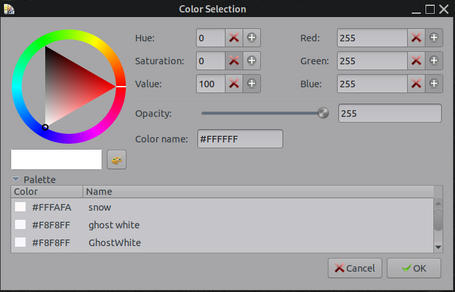
Miyolinux has some cool videos on youtube about doing this and making menu entries for it.
#231 Re: Other Issues » [SOLVED] Growing file bloat in ~/.dbus/session-bus and /root/.dbus/session-bus » 2025-10-14 19:54:38
So looks like whatever display manager is used, a folder is created in /var/lib/(display-manager)/.dbus/session-bus/*
But i'm still trying to figure out what purpose it serves and how they got there, after logging in and out of that partition multiple times yesterday, that folder was not added to by the system, still just 21 files that all show they were created when I started a snapshot last week.
I did finally get around to messing with that, I deleted all the files in that folder, and rebooted multiple times and logins/logouts, and so far nothing has been generated back into that folder. And nothing seems amiss with the system whatsoever. I'm wondering if the system generates a file in there on install, and never gens another, which is possible even though I had 20+ files in there because this system has been snapshotted/installed many times and I guess it just genned a new one every time?
#232 Re: Other Issues » Alsa errors during boot of Excalibur » 2025-10-14 19:47:15
Well nature always sides with the hidden flaw, lol, yeah looks like they fixed that 3 weeks ago.
But downstream must still be wrong, and it's not that part.
#233 Re: Desktop and Multimedia » Excalibur RC1 + Xfce + slim + auto login shows Untitled window » 2025-10-13 22:42:03
Tested. 2012 Compaq CQ-58 dual core AMD C-60 APU
Would not boot up the live-session normally, or in failsafe mode. Had to use "e" to edit, added nomodeset to the boot command and it started booting. Metric TON of those alsactl restore warnings during the process, over and over again, we really need to fix that.
Booted up in 1024x768 with no way to change it on my widescreen. I don't know if the amd graphics firmware is on the iso, if not this could be the problem. It did autolog me in just fine.
#234 Re: Devuan Derivatives » [MiyoLinux] New Releases Uploaded » 2025-10-13 16:39:24
Bump.
Still the greatest collection of Devuan-based isos ever made IMO, and still available on Sourceforge, it's totally worth downloading some and giving them a spin. https://sourceforge.net/projects/miyolinux/
My projects still include some Miyo openbox themes, Miyolinux-Dark is the base of my hybrid theme, and the current wallpaper is actually a fractal I made that's my interpretation of an old Miyo "flying boxes" wallpaper from back in 2017.
#235 Re: Devuan » [SOLVED] SSL Certificate has expired (https://www.devuan.org) » 2025-10-13 14:51:03
Appreciate that^^, I reported it on the #devuan-dev channel.
#236 Re: Installation » cloning/template installation » 2025-10-13 10:48:43
It all seems like a lot of unnecessary hoo-ha, but maybe that's just me.
For cloning and re-deploying a custom OS, Refracta Snapshot is the way to go IMO, utterly simple and dependable.
#237 Re: Devuan » [SOLVED] Development and goal of Devuan. » 2025-10-12 19:08:47
Will it ever get to the point where it just wouldn't be feasible anymore for Devuan to be based off of Debian? If it ever gets to that point, would Devuan go totally independent, or is there too few developers for that?
There is always hope, I myself reached the requisite age mentioned by golinux not long ago, lol, so it's time soon for me to step up and be of real assistance with Devuan. There will be others. almost 100 distros listed on Distrowatch that do not use systemd. And Xlibre has stepped up to renew X11 so buggy wayland won't be forced on us.
Linux was always about rebels, corporate interests trying to wipe out choice just spawns new generations of rebels, who are especially pissed that the aforementioned corporate interests are sticking their noses into our beloved OS'es.
@golinux: EVERYTHING lasts forever in one form or another, the electrons in my body are billions of years old, and will live on long after I leave this form.
#238 Re: Devuan » [SOLVED] Development and goal of Devuan. » 2025-10-12 17:11:01
* something which can be a truly time consuming endeavour for our devs.
For sure, I can only imagine what a task that must be, hoping one day I can learn enough to help with it.
#239 Re: Other Issues » undefined symbol: sqlite3 column origin name » 2025-10-12 17:03:29
Well don't know if it's the issue, but your first post has the name of the ttf file as : SOMETHINSOMETHING.ttf
While your second post where you were looking up that font I guess, you wrote it as : SOMETHINGSOMETHING.ttf
Missing a "G" there or added one where it shouldn't be.
#240 Re: Off-topic » Critical security flaw in sudo » 2025-10-09 14:50:36
^^ I literally have a T-shirt with the sudo make me a sandwich cartoon on it, found it in a secondhand store years ago.
#241 Re: Off-topic » Critical security flaw in sudo » 2025-10-08 20:06:56
This is what I really like about Altoid, always a voice of reasonableness in a sea of chaos. Cheers buddy!
#242 Re: Installation » actuallization from Ceres impossible » 2025-10-08 20:04:06
Just from my limited messings around:
Apt and Synaptic work fine with both old and new styles, and indeed even having a mix of them.
Putting even one new style entry in /etc/apt/sources.list.d, breaks the ability to view/mod your repositories while in Synaptic.
As RRQ said, the more machine-readable stuff is just nonsense. Young coders particularly seem to get bored and change things just to change them, in corporate settings it's usually to try and justify their paycheck, in Linux it's just some weird fashion thing coupled with boredom. Some people actually enjoy breaking things just to bug-hunt. Some people in Linux are just doing things to piss off other people in Linux that they hate (usually for no good reason). Lots of dynamics going on. YMMV.
"Fashion is a form of ugliness so intolerable that we have to change it every six months"
~Oscar Wilde
#243 Off-topic » Critical security flaw in sudo » 2025-10-08 18:59:43
- greenjeans
- Replies: 19
https://thehackernews.com/2025/09/cisa- … -flaw.html
"Sudo contains an inclusion of functionality from an untrusted control sphere vulnerability," CISA said. "This vulnerability could allow a local attacker to leverage sudo's -R (--chroot) option to run arbitrary commands as root, even if they are not listed in the sudoers file."
Great, I don't even use sudo and it's STILL a security risk.
#244 Re: Devuan Derivatives » GNUinOS - Libre » 2025-10-08 18:34:55
@aitor, to get Xlibre running on Daedalus, did you have to install the libdrm packages from backports?
#245 Re: Desktop and Multimedia » noCSD for GTK4 » 2025-10-07 17:30:28
A new solution on the horizon for GTK4: https://codeberg.org/MorsMortium/GTK4-NoCSD
Currently in Arch: https://aur.archlinux.org/packages/gtk4-nocsd-git
Thinking about trying to package it, but i've pretty much thrown out all the gtk4 apps that were in my system.
#246 Re: Off-topic » When installing a system, do you manually partition first? » 2025-10-06 18:05:20
Still on bios and spinning rust here.
Ditto. And still winning, haven't had to buy a new machine since 2014.
#247 Off-topic » When installing a system, do you manually partition first? » 2025-10-06 17:09:36
- greenjeans
- Replies: 12
Curious as to what most folks do, wish we could add a poll on this forum.
So when installing a new system on your machine, do you let the installer program do the partitioning, or do you do it before firing up the installer using Gparted or some other method?
For myself, I always use Gparted first, so I know everything is done right before I attempt to install.
#248 Re: News & Announcements » How you can help Devuan » 2025-10-05 23:05:09
Transmission is the program I have used for a long time to manage torrents, there is a great deal of documentation for the program, and it should make it fairly easy to seed Devuan iso's.
EDIT: Sorry, don't know where my manners went, but welcome to Devuan and thank you for your willingness to contribute, it is much appreciated!
#249 Re: Hardware & System Configuration » Login as root on Graphcial desktop possible » 2025-10-05 19:13:42
Ahh I see, thanks for the explanation @rolfie.
The naive standard user who logs in as root has all possibilities to damage and wreck his system. Maybe "security" is not a perfect term for these risks.
I totally get that. It was just the term "security risk" that was throwing me off. Perhaps a better term might be "noob fat-finger risk" 
I myself run my machines normally the exact same way as you do, I work in the user account, and when I need to mod system files I use "open folder as root" or "edit file as root". If i'm working in terminal I su-to-root, I don't use sudo at all.
I have to admit, I have fat-fingered an install myself back in the day.
In my opinion lightdm shouldn't allow root access per default. It should be locked, and the experienced user may open this gate.
Agreed, that seems sensible.
#250 Re: Hardware & System Configuration » Login as root on Graphcial desktop possible » 2025-10-04 20:27:05
I consider a graphical root login as a security risk.
May I ask why? Just curious what the reasoning is for that.
Myself I would be very upset if I couldn't login as root on my own system on my own machine, that would be a deal-breaker for sure.
I don't normally run a root session, but I do like it to be available. I actually go to great lengths in Vuu-do to recreate the same experience in the root account that the user account has, nothing more jarring than logging in to a root account and having nothing but a blank screen.
Board footer
