
You are not logged in.
- Topics: Active | Unanswered
Pages: 1
#1 Re: Devuan Derivatives » Refractasnapshot – Comparison of different Compression Algorithms » 2026-07-13 15:34:30
Now I have integrated these insights in /etc/refractasnaoshot.conf
The compression sections of my refractasnaoshot.conf now looks like this:
-----------------------------
[...]
# Uncomment one of the lines below to use xz or zstd compression for smaller iso.
# small and slow # relative size of the iso-image
#mksq_opt="-comp xz" # (-4.1% to zstd -19 | -15,4% to zstd -1)
#mksq_opt="-comp xz -b 262144" # (-2.0% to xz)
#mksq_opt="-comp xz -b 524288" # (-3.8% to xz)
#mksq_opt="-comp xz -b 1048576" # (-5.5% to xz)
# smaller and slower:
#mksq_opt="-comp xz -Xbcj x86" # (-1.5% to xz)
#mksq_opt="-comp xz -Xbcj x86 -b 524288" # (-5.4% to xz)
#mksq_opt="-comp xz -Xbcj x86 -b 1048576" # (-6.9% to xz)
# not as small but faster
#mksq_opt="-comp zstd -Xcompression-level 22" # (= zstd -19 | --ultra ?)
#mksq_opt="-comp zstd -Xcompression-level 19" # (-11.8% to zstd -1)
mksq_opt="-comp zstd -Xcompression-level 15" # (-11.1% to zstd -1)
#mksq_opt="-comp zstd -Xcompression-level 8" # (-7.0% to zstd -1)
#mksq_opt="-comp zstd -Xcompression-level 3" # (-3.1% to zstd -1)
#mksq_opt="-comp zstd -Xcompression-level 1" # (-17.2% to lz4)
#mksq_opt="-comp lz4" # (+20,8% to zstd -1)
[...]
#2 Devuan Derivatives » Refractasnapshot – Comparison of different Compression Algorithms » 2026-06-28 17:29:11
- Xaver
- Replies: 2
When I was creating an iso-image of my new Refracta based system, I have noticed, that zstd -22 and zstd -19 deliver the same results. Obviously the zstd ultra mode does not work properly within Refractasnapshot. This inspired me to do some testing of different compression options.
Here are my results:
Total size of the system on qemu hd:
/ 4,09 GB + /home/ 289 MB = 4,37 GB
xz: 1572 MB (-4.1% to zstd -19 | -15,4% to zstd -1)
xz -b 262144: 1540 MB (-2.0% to xz)
xz -b 524288: 1512 MB (-3.8% to xz)
xz -b 1048576: 1486 MB (-5.5% to xz)
xz -Xbcj x86 1548 MB (-1.5% to xz)
zstd -22: 1639 MB ('zstd --ultra -22' does not work)
zstd -19: 1639 MB (-11.8% to zstd -1)
zstd -15: 1652 MB (-11.1% to zstd -1)
zstd -8: 1727 MB (-7.0% to zstd -1)
zstd -3: 1800 MB (-3.1% to zstd -1)
zstd -1: 1858 MB (-17.2% to lz4)
lz4: 2245 MB (+20,8% to zstd -1)
Relative compression speed according to Allan Jude (2017):
[https://openzfs.org/w/images/b/b3/03-Op … in_ZFS.pdf]
zstd -19 = 1x | zstd --ultra -22 = 0.58X
zstd -15 = 2.3x | zstd -8 = 16.1x
zstd -3 = 59.1x | zstd -1 = 101.5x
lz4 = 172.3x
According to Northon Torga (2024) xz and zstd -19 have a similar compression speed:
[https://ntorga.com/gzip-bzip2-xz-zstd-7z-brotli-or-lz4/]
zstd -19 = 1x | xz = 0.96x
Decompression speed of xz is about 5 times slower than zstd:
xz = ~0,18x | zstd = 1x | lz4 = ~ 3.2x
Depending on hardware and kind of files the actual results may differ.
#3 Re: Devuan Derivatives » Test ISO: refracta freia xlibre turnstile pipewire » 2026-06-28 15:36:34
Based on 'refracta_13.3_nox_amd64-20260501_1521.iso' I have created a similar system in qemu.
Already two years ago I had build such a system based on antiX-23 (bookworm). It is running stable on my desktop pc as my work horse.
These have been my steps:
(1) install refracta_13.3_nox with runit and seatd
(2) exclude unwanted packages via pins in /etc/apt/preferences.d:
00dbus-bin 00java-common 00libelogind0 00libsystemd0 00mono-runtime-common 00nodejs 00polkitd
(3) add antiX-26 repos to refracta
Give Devuan a higher priority than antiX in /etc/apt/preferences.d
To stay as close as possible to original Devuan I have turned on the antiX repos only when needed.
(i.e.: Arandr from Devuan cannot be installed – the antiX version is fine. Plank needs gconf-gsettings-backend from antiX to function properly.)
Once the base system has been completed, I shall keep the antiX repos turned on for upgrades.
(4) install from antiX-26:
# apt install turnstile runit-service-turnstiled libturnstile0
# apt install runit-service-seatd
(5) install my proven Openbox desktop
no display manager – just xinitrc | no pipewire – pure alsa
This setup should work with all window managers.
Desktops do not work. They all need active dbus daemons, whereas this setup uses libdbus-1-3 only.
(6) Power Management
For power management I use acpid, xset and the script suspend_if_idle (combined with i3lock and kdocker).
[https://gitlab.com/antiX-Linux/antix-go … type=heads]
(7) use lxterminal as pseudo gui
i.e.; obsession is crippled, lxsession needs polkit
As workaround in the openbox menu I use commands like the following:
<execute>lxterminal --geometry=39x4 --title=PowerOff -e bash -c "echo -- ???_PowerOff_??? __ [ENTER] = yes --; read line; (openbox --exit && sudo poweroff); echo read line"
<execute>lxterminal --geometry=90x32 --title=clamscan_Downloads -e "clamscan -v -r ~/Downloads; echo '<Enter> to Close Terminal'; read line"
So far I have found a solution for all my software needs within this setup.
The system is light, fast and stable and maybe a little more secure than standard.
I had to create one single dummy for pkexec, because gparted as dependency of refractainstaller-gui demands it. Of course pkexec is not really needed. Gparted starts as well with 'lxsu' or 'su-to-root -X -c'.
An extra benefit: The limitations have inspired me to find better alternatives to standard apps.
Example: I use SQLiteStudio instead of the bloated LibreOffice-Base.
Linux-libre works well, but I prefer the Devuan kernel for the option of non-free-firmware.
So far xorg has not caused any problems. Therefore I have not yet tested xlibre. It is in the antiX-26 repo. '#apt install -s xlibre' does not show any problems, but all the xserver-xorg-input-* packages will be removed.
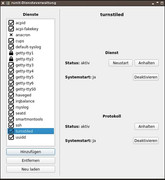
screenshot runit-service-manager https://postimg.cc/RqQnGVvg
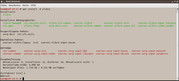
screenshot #apt install xlibre https://postimg.cc/kDFtwX7f
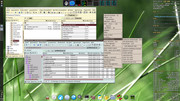
screenshot openbox desktop https://postimg.cc/mhNFV2TS
#4 Re: Devuan Derivatives » Refracta ready for Excalibur? » 2025-12-28 20:59:31
There seem to be two more bugs in refracta_13.2_nox_amd64-20251205_0850
(1) The iso boots well with efi in Qemu. But if installed to a Qemu VM with efi and runit, it does not boot. I could fix it with bootrepair-antix.
(2) The language settings do survive the installation, but not the keyboard setting. This could be fixed by
# dpkg-reconfigure console-setup (all settings were ok - only had to confirm all the settings)
# update-initramfs -u (to make keyboard settings permanent)
Pages: 1
Board footer
